Sending Push Notifications
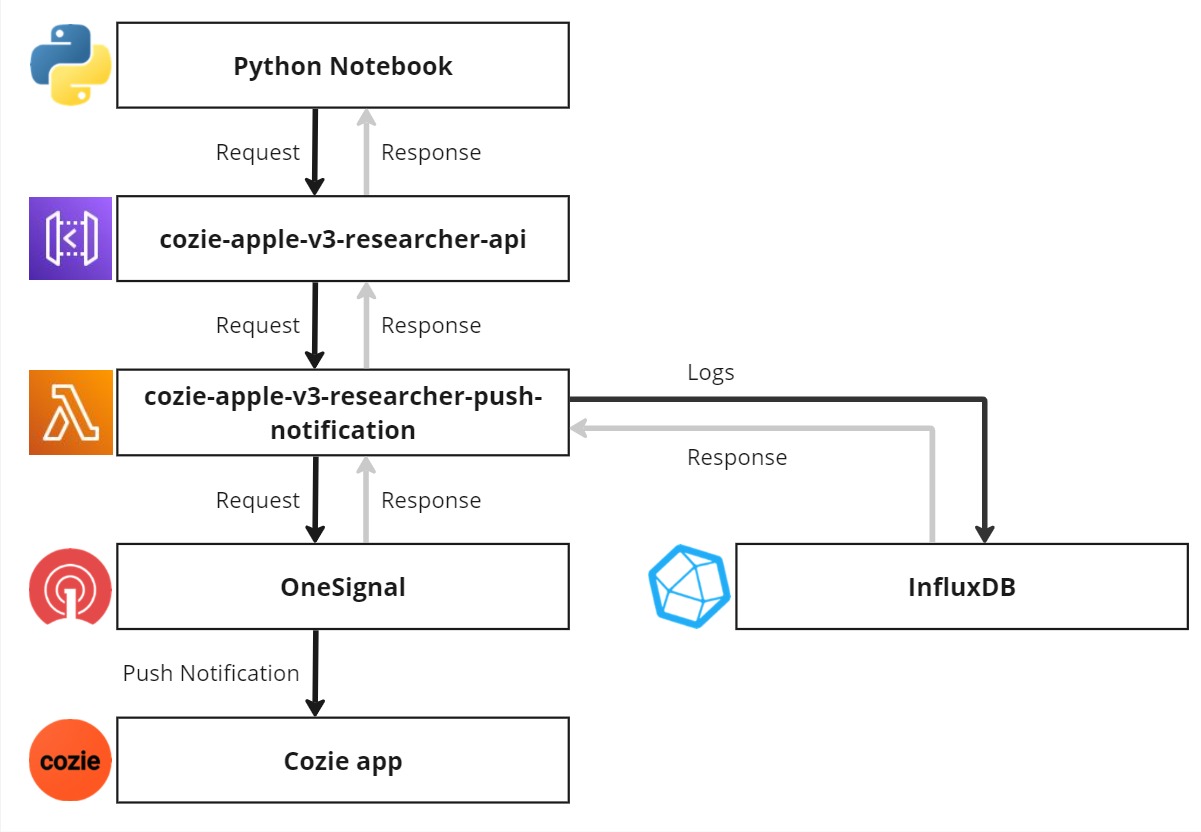
Overview
We use OneSignal as a push notification service provider. We offer an API to send push notifications to Cozie. If you want to send push notifications to Cozie independent of us, you will need to copy the Cozie source code and publish your own version of the Cozie app, while doing so you need to setup your own OneSignal account and replace the OneSignal credentials in the Cozie source code.
For custom app builds that call OneSignal directly without the Cozie hosted API or an AWS backend, see Direct OneSignal API Push.
Lambda function code
Lambda configuration
| Configuration | Value | Comment |
|---|---|---|
| General configuration | ||
| Memory | 512 MB | |
| Ephemeral storage | 512 MB | default value |
| Timeout | 0 min 10 sec | |
| Triggers | ||
| API Gateway | cozie-apple-v3-researcher-api | |
| Environment variables | ||
| DB_HOST | XXX.influxcloud.net | (replace 'XXX') |
| DB_NAME | cozie-apple | |
| DB_PASSWORD | XXX | (replace 'XXX') |
| DB_PORT | 8086 | |
| DB_USER | Cozie-Apple-Lambda-API-Push-Notification | |
| onesignal_app_id | XXX | (replace 'XXX') |
| onesignal_token | XXX | (replace 'XXX') |
| Layers | ||
| AWSSDKPandas-Python311 | AWS Layer for Pandas, Numpy, requests | |
| Influx | Custom layer for InfluxDB client |