Backend FAQ
This page covers backend, database, API, and push notification questions. For general Cozie AppStore questions, see the FAQ. For source-code customization and custom app development questions, see the App Developer FAQ.
Data and internet access
-
Where is Cozie data stored?
Cozie offers two ways to store data:-
Default
By default, Cozie-Apple data is stored on password-protected servers in Singapore and logged on the iPhone. The data can be downloaded from our online API. Data data can also be retrieved from the local backup file. -
Custom Database
Instead of using our database to store your data, you can also set up your own backend. Just replace the necessary API information in the Advanced tab and you can operate the Cozie app independent of us. No changes to the source code are required.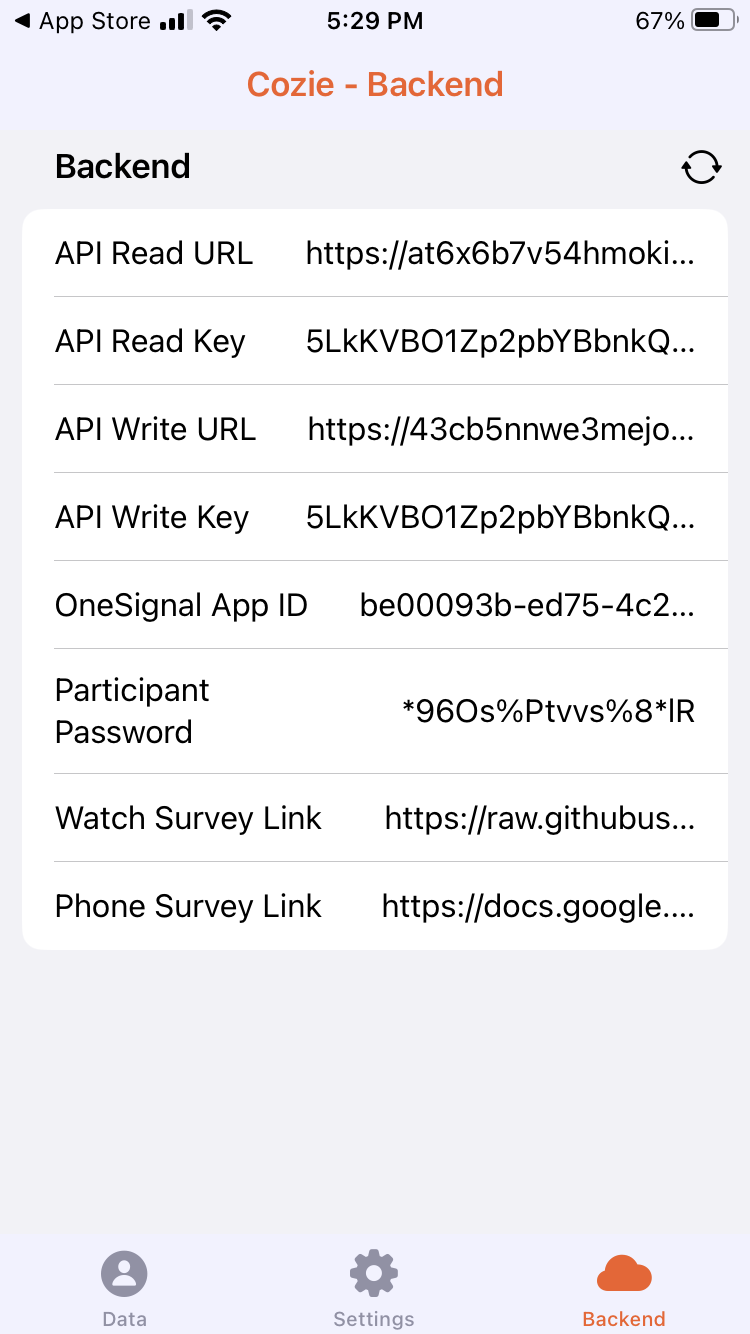
-
Performance
-
How long does it take for a push notification from OneSignal to arrive on the iPhone or Apple Watch?
Provided there is an internet connection, it usually takes less than ten seconds between sending a push notification, and the push notification appearing on the iPhone and/or the Apple Watch.
-
How frequently is the physiological data logged?
It is important to distinguish two terms: logging rate and sampling rate. The sampling rate is defined by the time between to measurement samples. The logging rate is defined by the points in time when the measurement samples were sent to the database.
Example:
timets_heart_ratets_heart_rate_lambdats_heart_rate_trigger2023-10-10 12:49 76 2023-10-10 12:53 background_task 2023-10-10 12:52 75 2023-10-10 12:53 background_task 2023-10-10 12:55 77 2023-10-10 13:15 application_appear The table above shows three samples of a heart rate measurement (
ts_heart_rate). Thets_heart_ratecolumn shows the value of the measurement in beats per minute (bpm).The
timecolumn shows when the measurement took place.The
ts_heart_rate_lambdacolumn shows the timestamp of when the sample was inserted into the database (logged).The
ts_heart_rate_triggercolumn records what triggered the Cozie app to send the data.In this example, the timestamps in
timeare three minutes apart. Hence, the sampling rate is 1 sample per 3 minutes.The first two rows were logged at the same time (
tes_heart_rate_lambda). The third row was logged 23 minutes later. Hence, the logging rate is 1 log per 23 minutes. The sampling rate cannot be influenced and is given by the data provided by iOS. The logging rate can be influenced, e.g., by opening the app, using the iPhone, and taking watch surveys. -
Is it possible to call the function that pulls the GPS location, heart rate data, etc., in a set interval without the participant interacting with the survey?
Well, having a live stream of all data is the dream. We've been working hard on that dream for a while. Here is the result: All HealthKit data is submitted twice:
- When the watch survey is submitted. In that case, the prefix is
ws_, e.g.,ws_heart_rate. - Then the HealthKit data is submitted a second time with the prefix
ts_, e.g.,ts_heart_rate.
ts_data has various triggers, e.g., when you open the app, when you press the sync buttons in the app, and sometimes it is sent in the background.You can check what triggered the transmission of the data and when it arrived in the database with the fields with the postfix
_triggerand_lambda, e.g.,ts_heart_rate_triggerandts_heart_rate_lambdaorws_heart_rate_triggerandws_heart_rate_lambda.You can increase the chances of the data being sent by using the iPhone. Because Cozie can only access HealthKit data when the phone is unlocked. But in our experience, the
ws_data has the highest update frequency, provided participants are reminded every hour and also provide a watch survey response accordingly.For the location, you already know about
ws_latitudeandws_longitude. There is alsots_latitude, andts_longitude. These location data are sent when the user changes their location. - When the watch survey is submitted. In that case, the prefix is
Push notifications
-
What is the maximal length of a push notification?
There are no hard limits on the length of a push notification. OneSignal states the following (Source):
- Title: About 25-50 character limit
- Message: About 150 characters limit
In any case, you must draft push notifications and test them on an Apple Watch to see whether they work as expected.
-
How many push notifications can be shown in a push notification?
There are no hard limits on the number of action buttons. OneSignal states the following (Source):
- iOS supports up to 4 buttons with Rich Notifications
However, in our own testing, we have seen that the action button payload can be up to 255 bytes, and one action button requires at least 22 bytes (1 ID character, 1 text character). Hence, the maximum number of action buttons with only one text character is eleven. Longer texts or IDs will result in fewer action buttons.
In any case, you must draft push notifications with action buttons and test them on an Apple Watch to see whether they work as expected.